


Three quick steps
1. Download the APP and sign in
Download and install the InkJoy Frame APP, then complete sign-up and sign-in.


如果你在中国大陆区使用,请点击这里。
2. Complete network setup and binding
Press and hold the device button for about 3 seconds. When the green light appears and the screen refreshes to the setup page, InkJoy Frame is in setup mode.
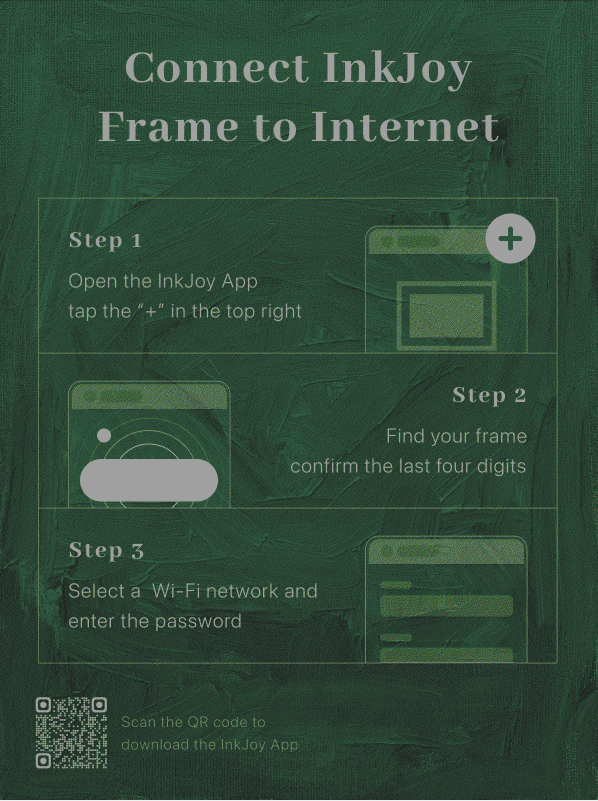
Then open the APP, tap the + icon in the top-right corner, scan the nearby frame, confirm the device number, enter the Wi-Fi information, and give the frame a name.
Detailed guide: Network Setup and Binding
3. Send your first photo
In the APP, choose a photo you like, adjust the preview, and send it to the frame.
Detailed guide: Send Your First Photo
- TIP
E-ink does not clear when powered off; rely on the indicator lights to confirm power state. For details, see Power Off and Reset and Indicator Lights.
Troubleshooting
If you ran into issues during network setup, see:
After the first setup
Once your first photo is on the frame, you can continue with the features below:
- Explore to browse official curated content and ready-to-display images.
- Personal Gallery to manage your own photos and saved content.
- Gallery Slideshow to make the frame rotate content automatically.