



In April 2026, Dr. Chen Rui was invited to speak at the 5th ePaper Sustainable Development Forum (ePSD 2026), where he presented “Unlocking the Full Color Potential of ePaper: Spectra 6 Rendering Mechanism and AI Enhancement Path.” During the presentation, he introduced a fictional developer who had just started working with E6 and followed that developer’s journey to examine the key challenges of Spectra 6 color rendering. He analyzed the limitations of conventional approaches—such as parameter tuning and dithering optimization—when dealing with a discrete color gamut and different types of content. The presentation prompted extensive discussion and received broad recognition from the audience. He then introduced ISFR, an AI-enhanced, system-level fusion rendering engine that offers a new technical approach to high-quality image rendering on color ePaper. (Adapted from the ePaper Industry Alliance event recap.)
Starting with this article, we will expand on the presentation and explore its contents in a multi-part series.
Halftoning and Dithering
Each pixel on an E Ink Spectra™ 6 (E6) display can ultimately show only one of six colors: black, white, red, yellow, blue, or green. Although certain driving and waveform techniques may produce additional intermediate states, this series uses the six base colors officially defined by E Ink as its baseline. Even if the number of available base colors were increased to several dozen, the principles and limitations discussed in this series would still apply.
So how can a display with only six pixel states show so many different colors?
The answer is simple: it takes advantage of the human eye’s ability to perform spatial averaging. When neighboring pixels are small enough and viewed from a sufficient distance, we no longer distinguish them individually. Instead, we perceive the area as a blended color.
This technique is called halftoning. It is a very old technique with a history of more than a century. Halftoning uses a limited set of output colors or gray levels to simulate continuous-tone images. Dithering is one of the most common ways to implement it.
Common dithering methods fall mainly into two categories: error diffusion and ordered dithering.
Error Diffusion
Let us begin with the most familiar example: black-and-white images. Dithering has already become a common operation on monochrome ePaper displays.
Imagine a small area made up of interleaved black and white pixels. Viewed up close, the two colors remain clearly distinguishable. At a normal viewing distance, however, the eye combines them and perceives gray. By changing the ratio of black to white pixels, different gray levels can be simulated.
How does the algorithm achieve this?
Error diffusion processes the pixels in an image one by one. It first selects the closest available output color, calculates the difference between the original and quantized values, and then distributes that error—using predefined weights—to neighboring pixels that have not yet been processed. Each individual pixel still has only a limited number of states, but the region as a whole can more closely reproduce the light and dark tones of the source image.
The Floyd–Steinberg algorithm, published in 1975, is one of the best-known error-diffusion algorithms and is used by many monochrome ePaper readers. Readers interested in learning more can refer to Eleven Common Dithering Algorithms and Source Code.
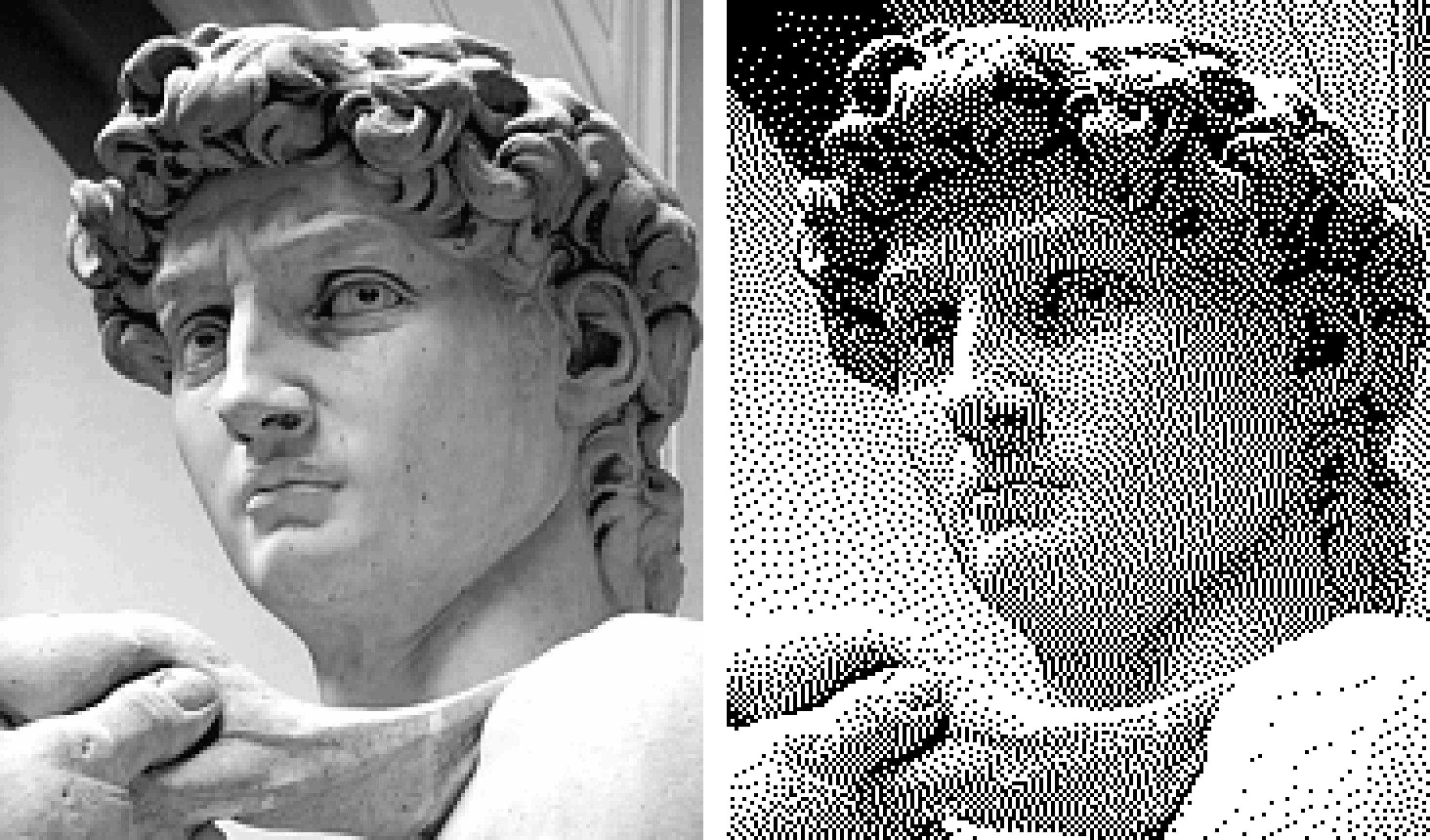
The image on the left is already grayscale. The image on the right uses only black and white pixels, applying Floyd–Steinberg error diffusion to simulate the tones and gradients of the source. If we enlarge the right-hand image, we can see that it contains no truly gray pixels—the apparent gray is created solely by varying the spatial density of black and white pixels.
Sources: 63-level grayscale image and Floyd–Steinberg dithered version. The sculpture is by Michelangelo; the images were prepared and dithered by Wikimedia user Gerbrant. The two public-domain images have been arranged side by side.
From Black-and-White to Six-Color Dithering
If different distributions of black and white pixels can simulate additional gray levels, we can naturally apply the same idea to color images: use the six E6 base colors at different spatial densities to simulate a wider range of colors.
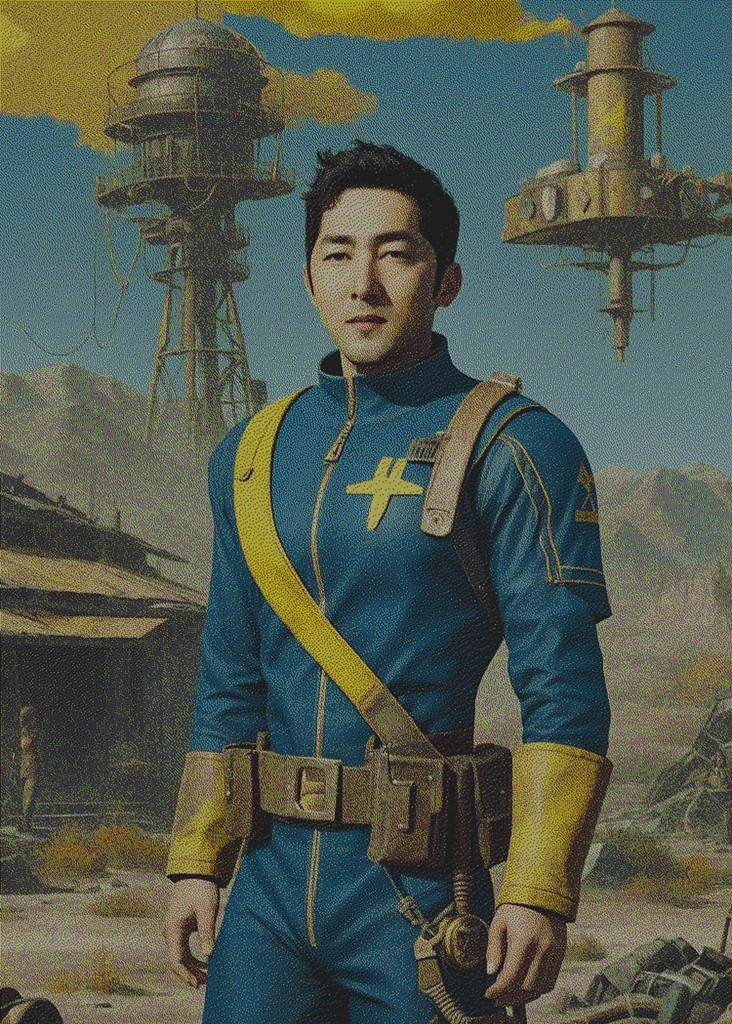
This cartoon portrait depicts Jerry, Secretary-General of the ePaper Industry Alliance, and is used with his permission.
Problem solved! This is also the most natural first approach for many developers working with an E6 display: quantize the source image directly to a six-color palette, then add dithering. Simple!
This does make it possible to “display” a photograph—but does being displayable necessarily make an image suitable for viewing?
Displayable Does Not Mean Pleasant to Look At
At a quick glance, the six-color dithered cartoon portrait of Jerry seems acceptable. The subject, background, and general colors are all still there—especially if we have never seen the original image.
But if the intended product is a home ePaper frame, the image may remain on a wall or desk for a long time. Is an image that can be displayed necessarily one that remains pleasant to look at?
On closer inspection, the image simply does not look very clean.
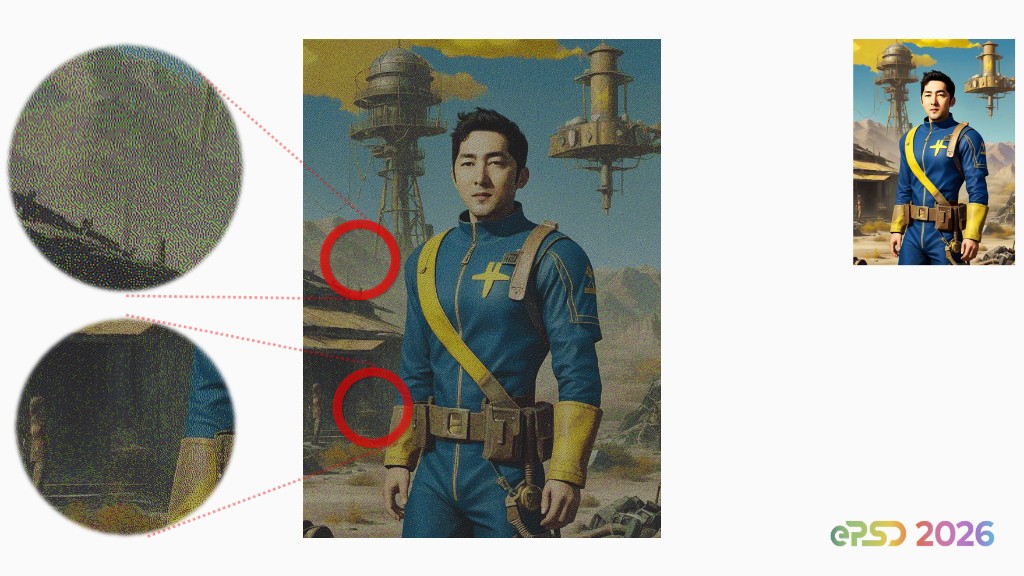
Let us focus only on the two regions circled in red. The upper circle marks a dark area beside the distant tower, while the lower one marks the shadow beside the figure. When enlarged, these relatively flat dark regions contain many tiny yellow and green speckles. These speckles are not details from the source image, and they make the result look dirty.
Is this noise simply the result of choosing the wrong dithering algorithm? Is it merely a collection of unwanted colors introduced by dithering to approximate intermediate colors?
In the next article, we will examine whether switching to a different dithering algorithm can produce a cleaner image—and what different algorithms actually change.
When industry professionals first see images rendered with InkJoy ISFR, they often notice that the images still contain many dots, yet somehow look much cleaner. This leads to a common question: “Is ISFR a proprietary dot-placement or dithering algorithm?” A more accurate answer is that dithering is only one subset of InkJoy ISFR.
This article is adapted and expanded from Dr. Chen Rui’s ePSD 2026 presentation, “Unlocking the Full Color Potential of ePaper: Spectra 6 Rendering Mechanism and AI Enhancement Path.”


